Note
Go to the end to download the full example code.
Augmenting text polygons#
Text polygons travel through torchvision.transforms.v2 as tv_tensors.KeyPoints;
torchocr.transforms.v2 adds a crop that never cuts a word and a sanitizer that keeps
texts and ignore aligned with the regions that survive.
from pathlib import Path

import matplotlib.pyplot as plt
import torch
from matplotlib.patches import Polygon
from torchvision.transforms import v2

from torchocr import OCRPipeline
from torchocr.datasets import TextDetectionTarget
from torchocr.io import load_image
from torchocr.transforms.v2 import RandomTextCrop, SanitizeTextPolygons, wrap_sample

ASSETS = Path("../examples")  # run from the gallery/ directory, as sphinx-gallery does
image = load_image(ASSETS / "english_doc.jpg")
A training sample is an image and a TextDetectionTarget. Datasets
such as TotalText return exactly that; here the target comes from
the pretrained pipeline so the example needs no dataset download.
pipeline = OCRPipeline.from_pretrained(
    "DBNet_ResNet18_VD_Weights.ICDAR2015", "CRNN_ResNet34_VD_Weights.MJSYNTH_ICDAR2015_TOTALTEXT_MLT19"
)
document = pipeline(image)
target = TextDetectionTarget(document.polygons, document.text, torch.zeros(len(document.text), dtype=torch.bool))
wrap_sample() wraps the sample as tv_tensors; from there any v2
transform moves the polygons with the pixels.
augment = v2.Compose([
    v2.RandomRotation(15),
    v2.RandomAffine(0, scale=(0.7, 1.5)),
    RandomTextCrop(),
    v2.Resize(size=None, max_size=480),
    SanitizeTextPolygons(),  # off-canvas words dropped, clipped ones marked don't-care
])

torch.manual_seed(0)
fig, axes = plt.subplots(2, 2, figsize=(10, 7))
for ax in axes.flat:
    out_image, out_target = augment(*wrap_sample(image, target))
    ax.imshow(out_image.permute(1, 2, 0))
    for quad, ignored in zip(out_target.polygons, out_target.ignore.tolist()):
        color = "#888888" if ignored else "#f5c400"
        ax.add_patch(Polygon(quad.as_subclass(torch.Tensor).numpy(), fill=False, edgecolor=color, linewidth=2))
    ax.set_title(f"{len(out_target.texts)} words", fontsize=9)
    ax.set_axis_off()
plt.tight_layout()
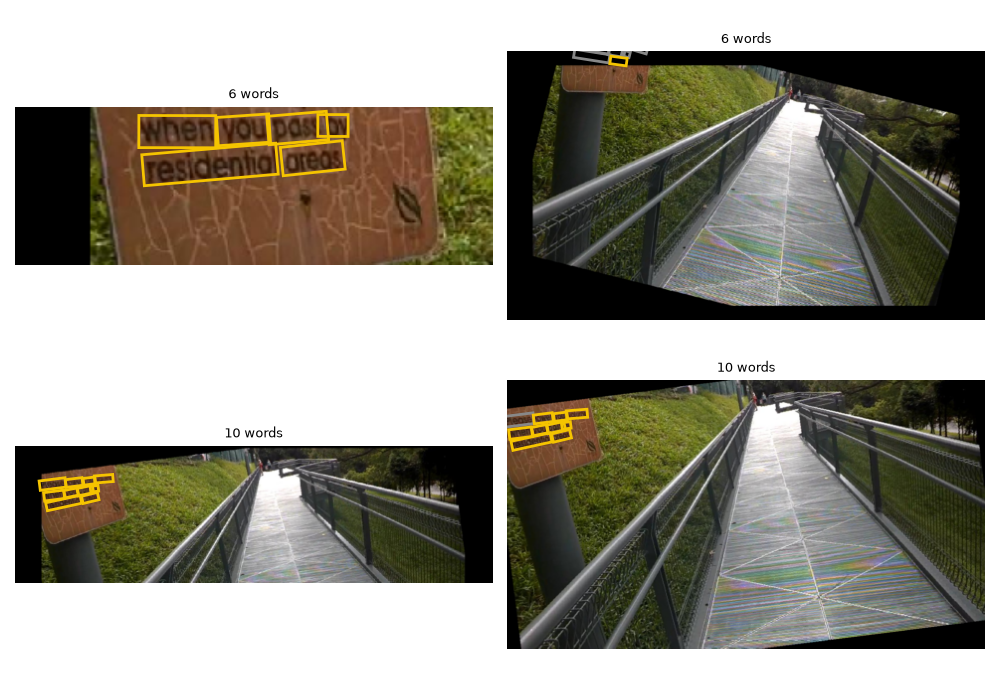
Grey outlines are words cut by the image border: they stay in the target as don’t-care
regions, which detection losses and metrics ignore. Feed the result to
MakeDBTargets to train a detector.
Total running time of the script: (0 minutes 3.004 seconds)